
Photo organizing software for Windows 11 offers helpful insights, enabling users to efficiently categorize and manage their images, strengthening accessibility and searchability.
Effective management of digital images is indispensable for users who frequently capture and store photographs. Photo organizing software for Windows 11 offers a variety of features designed to streamline the process of sorting and maintaining photo collections. These tools enable users to categorize images based on various criteria, such as date, location, and subject matter. By utilizing metadata embedded within the images, photo organizing software helps users locate pictures quickly and efficiently. This becomes particularly beneficial for those with extensive libraries accumulated over time.
Important key data
- Photo organizing software assists in managing and categorizing images for Windows 11.
- Utilizes hashing methods to identify duplicate images effectively.
- SortPix XL is a notable example of photo organizing software designed for Windows 11.
- Software can automatically detect and merge duplicate files, freeing up storage space.
- Metadata management includes details like date taken, camera settings, and location data.
- Different software approaches can vary in how they utilize and display photo metadata.
- Some tools may offer advanced filtering options based on metadata for augmented searching.
- User-friendly interfaces are important for easy navigation and organization.
- Regular updates can improve performance and introduce new features for Windows 11 compatibility.
Tagging and labeling functionalities are prominent features in many photo organizing applications. Users can assign tags to individual images or even batches, allowing for easy retrieval later. This method strengthens the searchability of the collection, as users can filter images based on specific tags. Additionally, the use of facial recognition technology in some photo organizing software for Windows 11 can automatically categorize images by identifying enthusiasts in photos. This innovative approach significantly reduces the time required to organize and find images.
Another critical aspect of photo organization is the ability to create albums or folders adapted to personal preferences. Many software options offer simple drag-and-drop functionality for moving and arranging images. Such flexibility allows users to design their photo libraries according to their specific organizational styles. Moreover, creating themed albums for events, vacations, or special occasions can aid in preserving memories in a more visually appealing manner. Users can easily navigate through their collections by having well-structured folders.
Backup and security features are also essential components of photo organizing software. Protecting precious memories from accidental loss or hardware failures is a priority for many users. Various practical uses offer cloud integration, ensuring that images are securely stored off-site. This provides an additional layer of protection even though allowing users to access their photos from different devices. Regular backup options can also be scheduled, eliminating the need for manual intervention.
Editing capabilities often accompany photo organizing features in many software suites. Users can apply basic enhancements such as cropping, adjusting brightness, and color correction without needing separate editing tools. Having these features integrated allows for a more seamless workflow, as users can organize and edit images in a single platform. Furthermore, some software enables batch editing, which is particularly useful for applying the same adjustments to multiple photos simultaneously. This efficiency can save considerable time when refining a large collection of images.
Collaboration features are increasingly common in modern photo organizing applications. Sharing albums with friends or family allows for collective experiences and memories to be preserved together. Some platforms enable users to create shared spaces where multiple individualists can contribute their own photos. This supports a sense of community, especially during events where many individuals capture different moments. Furthermore, collaborative features can enrich the organizational process by allowing different perspectives on arrangement and tagging.
Uses of Photo Organizing Software for Windows 11 with Hashing Method and SortPix XL
With tools like SortPix XL, photo organizing software for Windows 11 utilizes a hashing method to streamline image sorting, ensuring efficient management of extensive photo collections.
Photo organizing software for Windows 11 serves various purposes, catering to users who wish to manage their image collections efficiently. Such software typically provides tools for categorizing, tagging, and searching through vast libraries of images. With the increasing size of digital photographs, finding specific images can become a tedious task without the right organizational system in place. Users can benefit from features that allow batch processing, making it simpler to apply edits or metadata to multiple images simultaneously. This streamlining of the photo management process aids in maintaining a well-ordered digital gallery.
One notable feature in many photo organizing software applications is the integration of hashing methods to identify and manage duplicate files. Hashing algorithms generate a unique fingerprint for each image, enabling the software to detect copies within the library easily. This capability is critical for maintaining an organized photo collection, as duplicates can quickly clutter storage space and complicate searches. By employing hashing methods, users can guarantee that their galleries contain only unique images, thereby optimizing storage efficiency. This functionality is particularly advantageous for people who frequently import images from various sources.
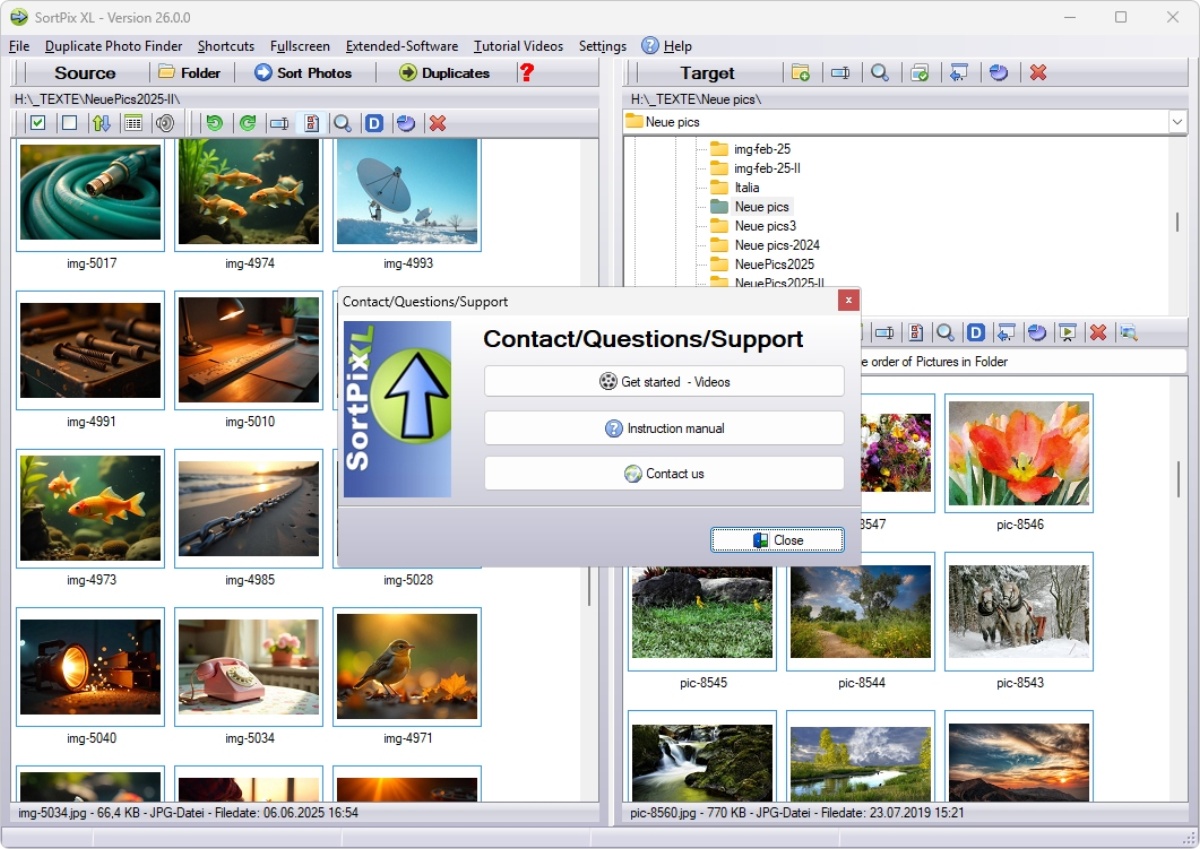
SortPix XL stands out as a specific example of photo organizing software for Windows 11 that incorporates these features. It offers a user-friendly interface that facilitates the organization of images through intuitive categorization and sorting options. Users can create folders and subfolders, easily moving images into designated locations based on themes, events, or dates. Additionally, SortPix XL supports tagging, allowing for advanced search capabilities that improve the user experience. Such features help users maintain control over their collections, preventing the frustration that arises from disorganized folders.
Incorporating powerful search functionalities further boosts the appeal of photo organizing software for Windows 11. The ability to search for images by tags, creation dates, or even through facial recognition technology provides a level of convenience that is critical to efficient photo management. This sophistication allows users to locate specific images within seconds, regardless of the size of their library. Many software options are equipped with filtering tools that narrow down search results, making it easier to find exactly what is needed. Such efficiency in searches contributes to a streamlined photo management experience, which is indispensable for both casual users and professionals alike.
Moreover, photo organizing software can aid in the development of a backup strategy for images. With features that allow for easy export and sharing of organized albums, users can secure that their important photographs are preserved. Cloud storage integrations are increasingly common, allowing for offsite backups and additional security measures against data loss. Through the use of these software solutions, enthusiasts can implement a complete archival system that safeguards their visual memories over time. This aspect of digital photo management cannot be overlooked, especially as storage devices can fail or become obsolete.
Collaboration features in photo organizing software also present significant advantages for users who engage in group projects or professional photography. These tools enable easy sharing of images with colleagues or clients, facilitating feedback and collaborative editing. With cloud-based solutions, multiple users can access and modify collections simultaneously, generating a more ever-changing workflow. Such capabilities are fundamental in creative fields where collaboration leads to boosted outcomes and productivity. By using software that integrates these features, teams can work more efficiently and cohesively.
Uses of Photo Organizing Software for Windows 11: Hashing Method in SortPix XL
| Feature | Description | Benefit | Example | Consideration |
|---|---|---|---|---|
| Image Hashing | The technique of converting images into unique hashes for quick comparison and organization. This ensures that duplicate images are easily identified and managed. | Improves the efficiency of organizing large photo libraries by eliminating duplicate files, saving valuable storage space. | Using the hashing method, a user can quickly find and delete copies of the same photo taken during an event. | Secure that the hashing method used is reliable and can handle various image formats without errors. |
| Metadata Management | Photo organizing software allows users to edit and manage metadata associated with each image, including tags, location data, and descriptions. | Boosted search capabilities lead to faster retrieval of photos based on specific criteria, making organization more intuitive. | For example, adding location tags to vacation photos makes it easier to find all images taken at a specific destination. | Be cautious about maintaining accurate metadata to make certain efficient organization over time. |
| Batch Processing | The ability to apply actions to multiple images at once, such as renaming, resizing, or applying filters, streamlines the organization process. | This feature saves significant time, especially when dealing with hundreds or thousands of photos. | A wedding photographer can quickly resize all images to a standard format before sharing with clients. | Check that batch operations do not overwrite original files except if intended. |
| Customizable Organization | Users can create custom folders and categories to organize their images based on personal preferences or project needs. | This flexibility allows people to tailor their photo organization strategy to fit their unique workflows. | A user might create separate folders for family, travel, and events, making photos easier to locate. | Regularly review and adjust the organization structure to confirm it meets evolving needs. |
| Cloud Integration | Many photo organizing applications can connect with cloud storage services, enabling easy backup and access to images from any device. | This offers a layer of protection against data loss, ensuring that photos are safely stored and accessible anywhere. | A user can access their library of photos from their laptop during traveling, ensuring important memories are always on hand. | Be aware of privacy concerns and select storage solutions that prioritize data security. |
Useful Information on Detecting Duplicate Files in Photo Organizing Software for Windows 11
Photo organizing software for Windows 11 is invaluable for detecting duplicate files, allowing users to save space and maintain a clutter-free digital photo library gracefully.
Photo organizing software for Windows 11 offers various tools and functionalities that boost the management of digital images. Many users face challenges related to cluttered photo libraries, which can make locating specific images a time-consuming task. This software includes features for categorizing photos by date, location, or even events, streamlining the process of finding desired images. Advanced search capabilities allow users to filter results based on specific criteria, such as file type, size, or date taken. The intuitive interfaces in these applications facilitate a smoother user experience, catering to experts who may not be tech-savvy.
A notable feature in many photo organizing software solutions for Windows 11 is the ability to detect duplicate files. Duplicate photos can accumulate from various sources, including multiple uploads from smartphones, cameras, or social media. The software typically scans through collections to identify identical images, allowing for easy removal or merging. This not only helps in freeing up valuable storage space but also contributes to a more organized library. Users can customize the criteria for duplicate detection, choosing to reflect on file size, resolution, or metadata.
Organizing photos often involves tagging and adding metadata. Effective photo organizing software for Windows 11 facilitates the application of tags and descriptions to images, enriching the context of each file. Users can input information such as location, event names, or key individuals present in the photographs. This metadata allows for a more refined search experience, enabling quick access to specific images based on their associated tags. The ease of tagging empowers users to create a personal database that can be navigated efficiently.
Integration with cloud services is another significant aspect of modern photo organizing software for Windows 11. Many applications allow users to upload and sync their photo libraries with cloud storage platforms, ensuring access from multiple devices. This feature offers a sense of security, as it provides backup options in case of hardware failure or accidental deletions. Additionally, cloud integration may facilitate sharing photos with others flawlessly, preserving the original quality of images during the transfer. Many users find this functionality vital for managing large collections of photos across different platforms.
Sorting and creating albums is simplified by the use of specialized features in photo organizing software for Windows 11. Users can create albums based on various themes, occasions, or timelines, making it easier to curate collections for viewing or sharing. These areas of useten support drag-and-drop functionality, allowing for quick organization of images into the desired folders or albums. Some software programs even offer automation features that can create albums based on predefined criteria, amplifying efficiency in organizing large volumes of images. This capability supports the need for well-structured digital libraries.
Editing capabilities are also integrated into several photo organizing software solutions for Windows 11. Basic editing options, such as cropping, rotating, or adjusting brightness, may be included directly within the software, eliminating the need for separate applications. This integrated approach allows users to refine images as they organize them, resulting in a more polished photo library. Advanced features might include filters, color correction, or even batch processing, which is particularly beneficial for users managing numerous files. This all-encompassing functionality addresses the diverse needs of photo enthusiasts and casual users alike.
Useful Information About Photo Organizing Software for Windows 11: Detecting Duplicate Files
Organizing your photo library can be a formidable task, especially when duplicate files clutter your collection. Luckily, there are several software options available for Windows 11 that can help you efficiently manage and eliminate duplicate photos. Below is a exhaustive enumeration of useful information regarding these tools:
- Interpreting Duplicate Files – Duplicate files are copies of the same file that occupy unnecessary space on your hard drive. These can arise from imports, backups, or simply saving the same photo multiple times.
- Benefits of Duplicate File Detection – Using software that identifies duplicates can save storage space, improve organization, and augment the overall speed of your device.
- Key Features to Look For – When choosing photo organizing software, consider features like:
- Advanced Algorithms for Accurate Detection
- User-Friendly Interface
- Batch Processing Capabilities
- File Preview Options
- Customizable Settings for Duplicate Criteria
- Popular Software Options – Some notable programs that can detect duplicate files for Windows 11 include:
- Duplicate Cleaner Pro – Known for its strong features and flexibility.
- CCleaner – A versatile tool that also offers duplicate file scanning.
- Auslogics Duplicate File Finder – A free tool that is easy to use and effective.
- Gemini 2 – A Mac-focused tool that also offers a Windows version for duplicate photo management.
- Wise Duplicate Finder – Provides a simple, straightforward interface for quick duplicate detection.
- How to Use Duplicate File Software – Generally, the process includes:
- Installing the software on your Windows 11 device.
- Scanning specific folders or drives for duplicates.
- Reviewing the results and selecting files to delete or move.
- Following the prompts to complete the cleanup process.
- Best Practices for Organizing Photos – To maintain a tidy photo library:
- Regularly perform duplicate scans.
- Organize photos into folders by date, event, or category.
- Utilize cloud storage for backup and accessibility.
- Consider renaming files for easier identification.
- Conclusion – Photo organizing software for Windows 11 that can detect duplicate files is an crucial tool for anyone looking to streamline their image collection. By choosing the right software and following best practices, you can reclaim valuable storage space and enjoy a more organized digital life.
Variations in Photo Organizing Software for Windows 11 Regarding Photo Metadata
Main Differences in photo organizing software for Windows 11 often stem from how they handle photo metadata, influencing organization methods and the overall user experience significantly.
Photo organizing software for Windows 11 varies significantly in features and functionality, catering to different user needs and preferences. One of the primary distinctions among these applications lies in their approach to photo metadata. Metadata encompasses indispensable information about each image, such as creation date, camera settings, and location data. Some software solutions prioritize vigorous metadata management, allowing users to easily edit, annotate, and search based on this information. This feature is particularly useful for users with extensive photo libraries who need a quick way to locate specific images or group similar photos together.
Another key difference in photo organizing software for Windows 11 is the user interface and ease of navigation. Various purposes forfer different layouts, ranging from grid views to detailed lists. An intuitive interface can noticeably raise the user experience, allowing for efficient sorting and tagging of images. Additionally, the organization tools can differ—with some programs providing folders and albums, meanwhile others may offer tagging systems or smart collections. The choice of interface can influence how quickly users can adapt to the software and manage their photo collections.
Cloud integration also represents a notable variation among photo organizing software for Windows 11. Some applications provide smooth synchronization with cloud storage services, enabling users to access their photos from multiple devices. This can be particularly beneficial for photographers who shoot on various devices and need to consolidate their images in one place. On the other hand, some software may focus solely on local storage, offering improved privacy and security for users who prefer to keep their files offline. Depending on the user’s backup preferences, the cloud integration feature can be a determining factor in software selection.
Import and export capabilities are another necessary aspect to evaluate when evaluating photo organizing software for Windows 11. Different applications support various file formats, which can affect how images are imported and shared. Some software may specialize in specific formats or provide more extensive conversion options, making it easier for users to work with different types of images. Additionally, the speed and efficiency of importing large batches of photos can vary, which might influence a user’s choice. Efficient import/export processes help streamline workflow, particularly for professional photographers or idealists managing large collections.
Editing features also differ from one application to another, with some providing basic tools although others offer advanced editing capabilities. Built-in editing functionalities can enrich the utility of photo organizing software for Windows 11, allowing users to make quick adjustments without needing separate software. Color correction, cropping, and basic retouching tools integrated into the organization software can save time and improve productivity for users. The availability of these features can vary widely, impacting user satisfaction and the overall efficiency of photo management. For those who prioritize editing alongside organization, choosing software with inclusive editing options may be crucial.
Sorting algorithms and AI-driven suggestions can significantly influence how effectively photos can be organized. Some software utilizes advanced algorithms to automatically categorize images based on content recognition, making it easier to find similar photographs. This feature can be particularly advantageous for large collections, reducing the time spent manually sorting through images. The effectiveness of these algorithms can vary, with some providing more accurate suggestions than others. Users looking for automated organization will benefit from researching software that incorporates these advanced features.