
Windows 11 photo manager software caters to photographers, graphic designers, and casual users, enabling efficient keywording of images for easy organization and retrieval.
Windows 11 photo manager software serves a diverse selection of user groups, each with distinct needs and preferences. Hobbyist photographers often seek this software to organize their personal collections. With capabilities for sorting and tagging images, it improves the experience of managing large volumes of photos taken during family events, vacations, and special moments. Users in this category typically benefit from features that allow for easy navigation and searching through extensive libraries, making the retrieval of specific images simpler. The intuitive interface of Windows 11 photo manager software can greatly streamline the process of tagging photos with keywords, enabling users to create an organized and accessible photo archive.
Professional photographers represent another critical user group for Windows 11 photo manager software. This demographic often requires advanced functionalities for managing their portfolios and client work. The ability to categorize images with keywords assists in creating a systematic filing system that supports efficient workflow. Many professionals rely on detailed metadata management, allowing them to track various attributes of their images, such as the location, shooting conditions, and subjects. The software’s capability to handle large image files without compromising performance is particularly advantageous for this group.
Key information
- Overview of user groups utilizing Windows 11 Photo Manager software, focusing on effective keywording for image organization.
- Insights and best practices for implementing photo keywords within the software to enrich searchability and categorization.
- Guidance on applying tools like Photo Duplicate Detective and SortPix XL to streamline photo management processes for Windows 11.
- Explanation of how EXIF data functions within the Windows 11 Photo Manager, aiding in metadata management and retrieval of photo details.
Educators and students also utilize Windows 11 photo manager software for projects involving visual content. In academic settings, the organization of educational materials can be indispensable for presentations and assignments. By using effective keywording techniques, users can easily locate specific images that align with their topic of interest. This feature not only saves time but also encourages thorough research and information retention. Educational institutions often find that such software amplifies the learning experience, allowing for more ever-changing and engaging presentations.
Digital marketers form another significant user group that benefits from using Windows 11 photo manager software. The need to manage a plethora of graphics, promotional images, and social media content is indispensable in this high-speed environment. Keywording images allows marketers to streamline their content strategy by ensuring that visuals are easily searchable and appropriately categorized. This systematic approach contributes to maintaining brand consistency across various platforms. By using the software’s features, digital marketers can effectively monitor and assess the performance of their visual content.
Graphic designers and visual artists also find value for Windows 11 photo manager software, as it assists with the organization of their creative assets. The software enables users to group images based on projects or themes, allowing for easy access to relevant materials when needed. Effective keywording not only aids in organization but also facilitates collaboration with clients and other professionals. As visual projects often require feedback and revisions, having a well-structured library helps maintain clarity and efficiency in communication. In this way, the software becomes an crucial tool for amplifying productivity and creativity within the design process.
Another group that relies for Windows 11 photo manager software consists of social media influencers and content creators. The visual-driven nature of their work demands a powerful organizational system for managing a wide range of photos and videos. The ability to tag images with specific keywords helps streamline content planning and ensures consistency across multiple platforms. This feature allows creators to quickly find and repurpose content that aligns with their brand messaging. With an organized library, influencers can maintain a cohesive aesthetic that echoes with their audience.
Target User Segments for Windows 11 Photo Manager Software: Strengthening Image Keywording
The following user groups can benefit significantly from using Windows 11 photo manager software for keywording images. Each group has unique needs and preferences that can be addressed through effective keywording practices.
- Organizing portfolios with relevant keywords.
- Facilitating client search and retrieval of specific images.
- Improving SEO for online portfolios.
- Learning the basics of image organization.
- Experimenting with different keyword strategies.
- Sharing images on social media with proper tagging.
- Curating images for blogs and social media posts.
- Utilizing keywords for better content discoverability.
- Creating cohesive image libraries for various projects.
- Efficiently managing stock images and assets.
- Finding images quickly based on specific keywords.
- Ensuring consistency in visual content across projects.
- Optimizing image usage for campaigns.
- Analyzing trends in visual content performance.
- Applying keywords for targeted advertising.
- Cataloging historical images with descriptive keywords.
- Facilitating easier access to archived materials.
- Maintaining organized databases for research purposes.
- Documenting family events with organized albums.
- Tagging images of special occasions for easier sharing.
- Creating memory collections that are easy to navigate.
- Organizing teaching materials and resources.
- Creating lesson plans with relevant visuals.
- Facilitating collaborative projects with students.
Specific Notes on Photo Keywords for Windows 11 Photo Manager Software
Notable features of Windows 11 photo manager software include the ability to assign and edit photo keywords, improving search capabilities and improving overall workflow efficiency.
Windows 11 photo manager software is developed to boost the organization and management of digital images. With a user-friendly interface, it provides tools that facilitate easy navigation through large collections of photos. The software supports various file formats, ensuring compatibility with most images captured on modern devices. Strengthened search functionalities allow users to locate specific images rapidly, especially when dealing with extensive libraries filled with thousands of pictures. By utilizing metadata and tags, the software simplifies the process of categorizing and retrieving images.
The photo organization features within Windows 11 photo manager software enable users to create albums and collections designed specifically to specific themes or events. By grouping images in this manner, it becomes easier to manage and revisit cherished memories. The software also provides options for adding keywords to images, which augments the searchability within the photo library. These keywords can be descriptive terms that help identify the content, context, or location of the photographs. Effective keywording ensures that users can easily locate specific images, even in a well-populated digital library.
Editing capabilities are a significant aspect of Windows 11 photo manager software, allowing users to boost their photographs with various tools. Basic editing features include cropping, adjusting brightness and contrast, and applying filters. These editing options can improve the aesthetic quality of images without the need for external software. Additionally, the software may include advanced tools for removing blemishes or correcting lens distortions, catering to both casual photographers and enthusiasts. Streamlined editing functions secure that users can augment their images efficiently even though maintaining quality.
Integration with cloud storage solutions is another key feature of Windows 11 photo manager software. This integration offers a perfect way to back up images and access them from multiple devices. By synchronizing with cloud services, users can assure that their photo libraries are secure and accessible from anywhere. This functionality is especially beneficial for users who need to manage their photographs across different devices, such as tablets and smartphones. The ability to store photos in the cloud aligns with modern needs for mobile access and data protection.
Sharing capabilities are also vital in any photo management software. Windows 11 photo manager software typically provides options for sharing images directly through social media platforms or via email. This feature allows users to showcase their work quickly and efficiently to friends and family. Sharing options include functionalities for resizing images or creating links to specific albums, augmenting flexibility. Such capabilities make certain that sharing photographs becomes a hassle-free experience, promoting user engagement with their digital content.
Additionally, the software may offer features that facilitate photo printing and slideshow creation. Users can select specific images or albums for printing directly from the application, streamlining the process of producing physical copies. Slideshow creation capabilities allow for the curation of images into a cohesive presentation, ideal for events or home displays. These features improve the overall utility of the Windows 11 photo manager software, catering to various user needs. By enabling physical and lively presentations of digital images, the software bridges the gap between virtual and tangible experiences.
Tips for Using Photo Duplicate Detective and SortPix XL for Windows 11 Photo Manager Software
To effectively manage duplicates in your photo library, use tools like SortPix XL with Windows 11 photo manager software, ensuring a streamlined and clutter-free collection.
Utilizing Windows 11 photo manager software can greatly enrich the organization and management of digital images. This software includes features that enable users to effectively categorize and sort photos, making it easier to locate specific images. A well-structured library can save time and effort when searching for pictures, whether for personal use or professional projects. Tagging photos with keywords and creating albums based on events or themes further streamlines the process. Additionally, advanced filtering options help users quickly display images based on various criteria, such as date or file type.
Finding and eliminating duplicate photos can be a challenging task. The inclusion of photo duplicate detective tools within Windows 11 photo manager software simplifies this process considerably. Such tools typically scan directories for identical or similar images, allowing users to make informed decisions about which files to keep. These features provide side-by-side comparisons, enabling a clear comprehension of differences between files. Regularly using these tools not only saves storage space but also helps maintain an organized photo library.
Another significant feature in photo management applications is the ability to edit images directly within the software. Basic adjustments like cropping, rotating, and color correction can boost the visual appeal of photos without the need for external editing programs. More advanced editing features may also be available, allowing users to apply filters, create collages, or add text. By integrating these tools into Windows 11 photo manager software, users can streamline their workflow, reducing the time spent switching between different applications. A cohesive editing experience promotes creativity and facilitates the sharing of polished images.
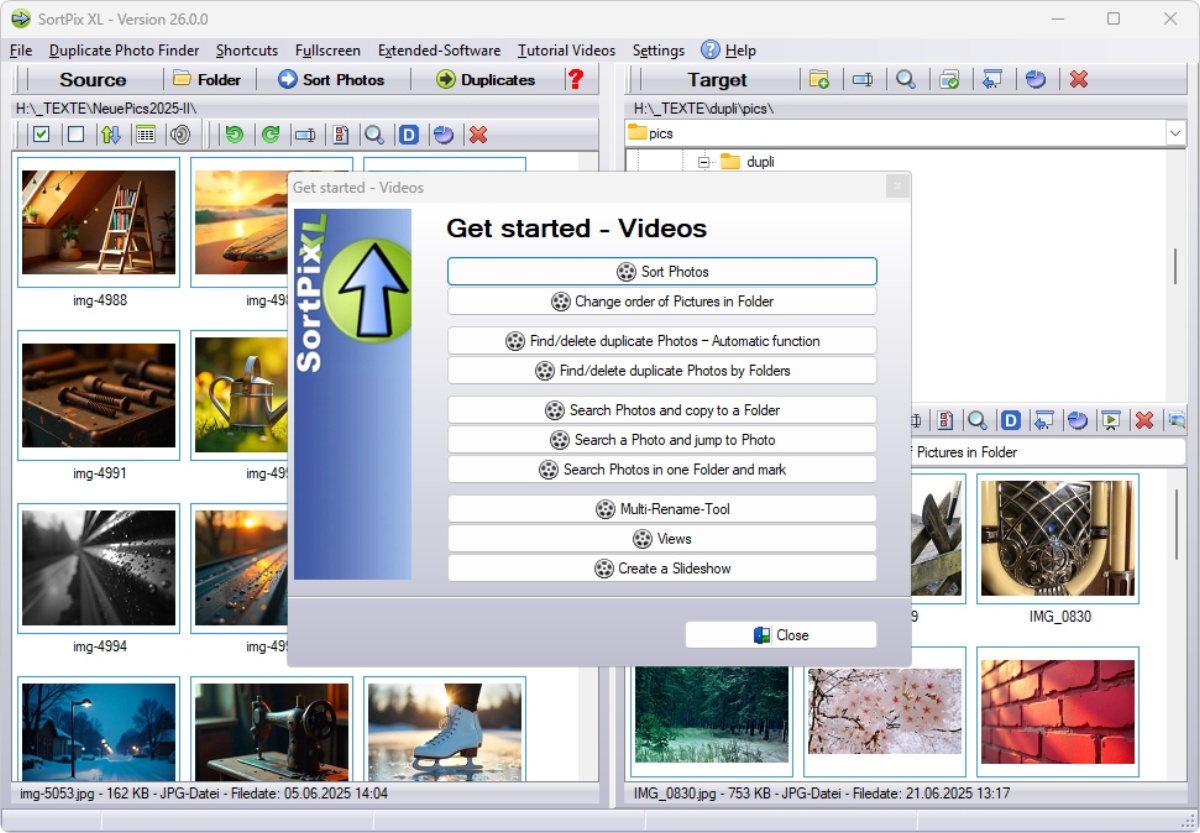
SortPix XL is another software option that complements the capabilities of Windows 11 photo manager software. This application is precisely designed for sorting and organizing large collections of images efficiently. Its user-friendly interface enables users to sort photos by various parameters such as date taken, file size, or resolution. Additionally, SortPix XL aids in creating structured folders based on user-defined criteria, making the entire photo library easier to navigate. The software’s ability to handle multiple formats and batch processing boosts its utility for users with extensive image collections.
Metadata management plays a critical role in photo organization. Windows 11 photo manager software allows users to edit and view metadata, including information such as camera settings, location, and date taken. By ensuring that metadata is accurate and up-to-date, users augment their ability to search and filter images effectively. This information can also be beneficial for users who require detailed records for professional or legal purposes. Utilizing metadata management tools within the software contributes to a more organized and accessible photo library.
Creating backups of digital photo collections is another important aspect of photo management. Users are encouraged to regularly back up their image libraries to avoid potential data loss. Windows 11 photo manager software integrates cloud storage options or external drive compatibility, facilitating easy backup processes. Regular backups confirm that valuable memories and important images remain secure, even in the face of hardware failure or accidental deletion. Establishing a routine for backups can significantly reduce the risk of losing irreplaceable photos.
Core Features of EXIF Data for Windows 11 Photo Manager Software
Windows 11 photo manager software outperforms in handling EXIF data, allowing users to view necessary image details like camera settings, location, and date taken for better organization.
Windows 11 photo manager software provides a sturdy platform for organizing and managing digital images. Users can efficiently browse through photo libraries with an intuitive interface designed for easy navigation. The software supports various file formats, ensuring compatibility with most digital cameras and mobile devices. As a result, users can import images directly and create customized folders for better organization. The capability to sort photos by various criteria, such as date, location, or tags, strengthens the overall user experience.
One key feature of Windows 11 photo manager software is its ability to display and analyze EXIF data embedded within images. EXIF, or Exchangeable Image File Format, contains crucial information about a photo, including the camera settings, exposure time, and GPS location data if available. This information is necessary for photographers who wish to understand their shooting conditions better or replicate specific photographic techniques. Users can access this data through a simple right-click or dedicated menu option within the software. By reviewing EXIF data, users can also gain insights into their photography habits and improve their skills over time.
Another notable functionality is the integrated editing tools present within Windows 11 photo manager software. Basic adjustments, such as cropping, resizing, and filtering, can be achieved directly within the application, eliminating the need for third-party editing software. Advanced editing options may include exposure adjustments, color correction, and the application of special effects. These tools are designed to cater to both casual users and those seeking more professional-level editing capabilities. The integrated transition between viewing and editing ensures a fluid workflow.
The software also includes features for sharing images across various platforms, strengthening connectivity with social media and cloud storage services. Users can quickly export their edited images or share them directly from the application. Integration with platforms like OneDrive allows for easy backup and access to photos from multiple devices. Additionally, batch processing capabilities enable users to apply changes to multiple images simultaneously, saving time and effort. This feature is particularly useful for photographers who handle large volumes of images.
An organizational aspect of Windows 11 photo manager software involves the use of tags and albums. Users can create custom tags to categorize images based on themes, events, or personal preferences. Albums can be created to showcase specific collections, making it easier to locate desired photos quickly. The search functionality improves this capability, allowing users to find images based on tags, dates, or even specific content utilizing object recognition features. This level of organization can drastically improve productivity when handling extensive photo libraries.
The software also offers a slideshow feature, providing users with a way to present their images dynamically. This functionality allows for the creation of visual narratives by arranging images in a sequence, complete with customizable transitions and effects. Furthermore, users can set timings for each image to improve the viewing experience. The slideshow can be an engaging way to share memories with friends and family during gatherings or events. This feature highlights the versatility of Windows 11 photo manager software beyond mere photo storage.